10 Response
By now you understand that every route handler must accept the request (req) and the response (res) objects.
In this chapter, we’ll focus on res.
The response object contains everything you need to send back a response for the received request.
In Ambiorix, a route is not complete until it sends back a valid response. This implies that the return value of your route handlers must always be a call to one of the methods in res eg. res$json().
To demonstrate what happens if you forget to call a response method, run this reprex:
library(ambiorix)

app <- Ambiorix$new()

app$get("/", function(req, res) {
  print("request received.")
})

app$start(port = 3000L)
At a minimum, a response consists of:
- an HTTP status code (eg. 200, 404, 500),
- optional headers,
- a body (which may be empty).
res gives you full control over all three.
10.1 Status
HTTP status codes are three-digit numbers that communicate the outcome of a request; whether it succeeded, failed, or requires additional steps.
The first digit indicates the class of response, and the next two digits provide additional detail.
Learn more about HTTP response status codes
By default, Ambiorix uses a 200 OK status on a response. But sometimes you need to be explicit.
Use the status active binding of res to set the status of the response:
app$get("/error", function(req, res){
  res$status <- 500L
  res$send("Error!")
})

app$get("/not-found", function(req, res){
  res$status <- 404L
  res$send("Page not found")
})
Be deliberate with the status codes. They communicate intent to the client more precisely than the body alone.
10.2 Headers
HTTP headers let the client and the server pass additional information with a message in a request or response.
They provide essential instructions that determine how a request or response should be processed. This includes specifying the media type of the content (Content-Type), the character encoding, the length of the content (Content-Length), and the client’s capabilities (e.g., the browser type via User-Agent).
10.2.1 Accessing Headers
The req$HEADERS object is a named list containing all the headers set by the client.
library(ambiorix)

app <- Ambiorix$new()

app$get("/", function(req, res) {
  print(req$HEADERS)

  res$send("Hello, World!")
})

app$start(port = 3000L)
When you run the above reprex and visit localhost:3000, you should see something along these lines on your console:
✔ 18-02-2026 01:44:24 Listening on http://127.0.0.1:3000
ℹ 18-02-2026 01:44:28 GET on /
$accept
[1] "text/html,application/xhtml+xml,application/xml;q=0.9,*/*;q=0.8"

$`accept-encoding`
[1] "gzip, deflate, br, zstd"

$`accept-language`
[1] "en-US,en;q=0.9"

$connection
[1] "keep-alive"

$cookie
[1] "auth=eyJ0eXAiOiJKV1QiLCJhbGciOiJIUzI1NiJ9.eyJleHAiOjE3NzM3MDcxNjEsImlhdCI6MTc3MTEwNDM2MiwidWlkIjoibjIzOGVIWnR0ZVFXM0pIUnRmcExmQ3piN3JCMyJ9.GjjnKy28j1ADxq_F4ju0ZFPZvjtDG3X9VJYbE3efnFM"

$host
[1] "127.0.0.1:3000"

$priority
[1] "u=0, i"

$`sec-fetch-dest`
[1] "document"

$`sec-fetch-mode`
[1] "navigate"

$`sec-fetch-site`
[1] "none"

$`sec-fetch-user`
[1] "?1"

$`upgrade-insecure-requests`
[1] "1"

$`user-agent`
[1] "Mozilla/5.0 (X11; Ubuntu; Linux x86_64; rv:147.0) Gecko/20100101 Firefox/147.0"
10.2.2 Setting Headers
You can add and set headers with the header method on the response object.
app$get("/hello", function(req, res){
  res$header("Content-Type", "something")
  res$send("Using {ambiorix}!")
})
If you have several headers, put them in a named list and use the set_headers() method:
app$get("/hello", function(req, res) {
  headers <- list(
    "Content-Type" = "something",
    "Access-Control-Allow-Origin" = "https://ambiorix.dev",
    "Header-Name" = "Header Value"
  )
  res$set_headers(headers)
  res$send("Using {ambiorix}")
})
10.2.3 Content Type
All the res methods we are going to discuss in this chapter set a specific Content-Type header on the response.
Quoting MDN Docs:
The HTTP Content-Type representation header is used to indicate the original media type of a resource before any content encoding is applied.
Here is a list of common MIME types:
| Extension | Kind of Document | MIME Type |
|---|---|---|
.png |
Portable Network Graphics | image/png |
.csv |
Comma-Separated Values | text/csv |
.htm, .html |
HyperText Markup Language (HTML) | text/html |
.json |
JSON format | application/json |
.xls |
Microsoft Excel | application/vnd.ms-excel |
.xlsx |
Microsoft Excel (OpenXML) | application/vnd.openxmlformats-officedocument.spreadsheetml.sheet |
.pdf |
Adobe Portable Document Format (PDF) | application/pdf |
.zip |
ZIP archive | application/zip |
Setting the content type on the response helps to identify the format of files, enabling web browsers, email clients, and servers to determine how to process, display, or handle content.
In addition, there are several methods for setting the Content-Type header of the response. These will come in handy when you’ve written your own custom serializers. They all have the prefix header_content_:
res$header_content_json()res$header_content_html()res$header_content_plain()res$header_content_csv()res$header_content_tsv()
10.4 Redirect
You’ve seen this numerous times: You visit a link in your browser, the link updates itself and sends you to another page. That is URL redirection. The server redirected your browser to that other page.
Quoting MDN Docs:
Redirects accomplish numerous goals:
- Temporary redirects during site maintenance or downtime
- Permanent redirects to preserve existing links/bookmarks after changing the site’s URLs, progress pages when uploading a file, etc.
…
In HTTP, redirection is triggered by a server sending a special redirect response to a request. Redirect responses have status codes that start with
3, and a Location header holding the URL to redirect to.
Using the redirect method of the response, and an appropriate status code, you can redirect clients to either an internal or external URL.
app$get("/redirect", function(req, res){
  res$status <- 302L
  res$redirect(path = "/")
})
If not specified,
statusconveniently defaults to302 "Found".302 is appropriate for most application redirects eg. post-login, form submissions, conditional routing etc. as it doesn’t pollute browser caches or tell search engines the original URL is gone forever.
Take a look at other redirection status codes and learn when to use which.
The
pathargument can either be:an internal path in the application eg. “/about”
res$redirect(path = "/about")or an external URL like “https://ambiorix.dev”.
res$redirect(path = "https://ambiorix.dev")
10.4.1 Example
Run the reprex below and visit /old and /about endpoints.
library(ambiorix)

app <- Ambiorix$new()

app$get("/", function(req, res) {
  res$send("<h1>Redirections</h1>")
})

app$get("/old", function(req, res) {
  res$status <- 302L
  res$redirect("/new")
})

app$get("/new", function(req, res) {
  res$send("You have been redirected to /new")
})

app$get("/about", function(req, res) {
  res$status <- 302L
  res$redirect(path = "https://ambiorix.dev/")
})

app$start(port = 3000L)
10.5 HTML
Send plain HTML with send.
library(ambiorix)

app <- Ambiorix$new()

app$get("/", function(req, res) {
  res$send("<h1>request received.</h1>")
})

app$start(port = 3000L)
This uses the text/html Content-Type header. To confirm this:
- Run the above reprex and visit localhost:3000 on your browser.
- Right click anywhere on the page, then click Inspect.
- Go to the Network tab and reload the page again.
- You should now be able to click on the response sent by the server and see this:
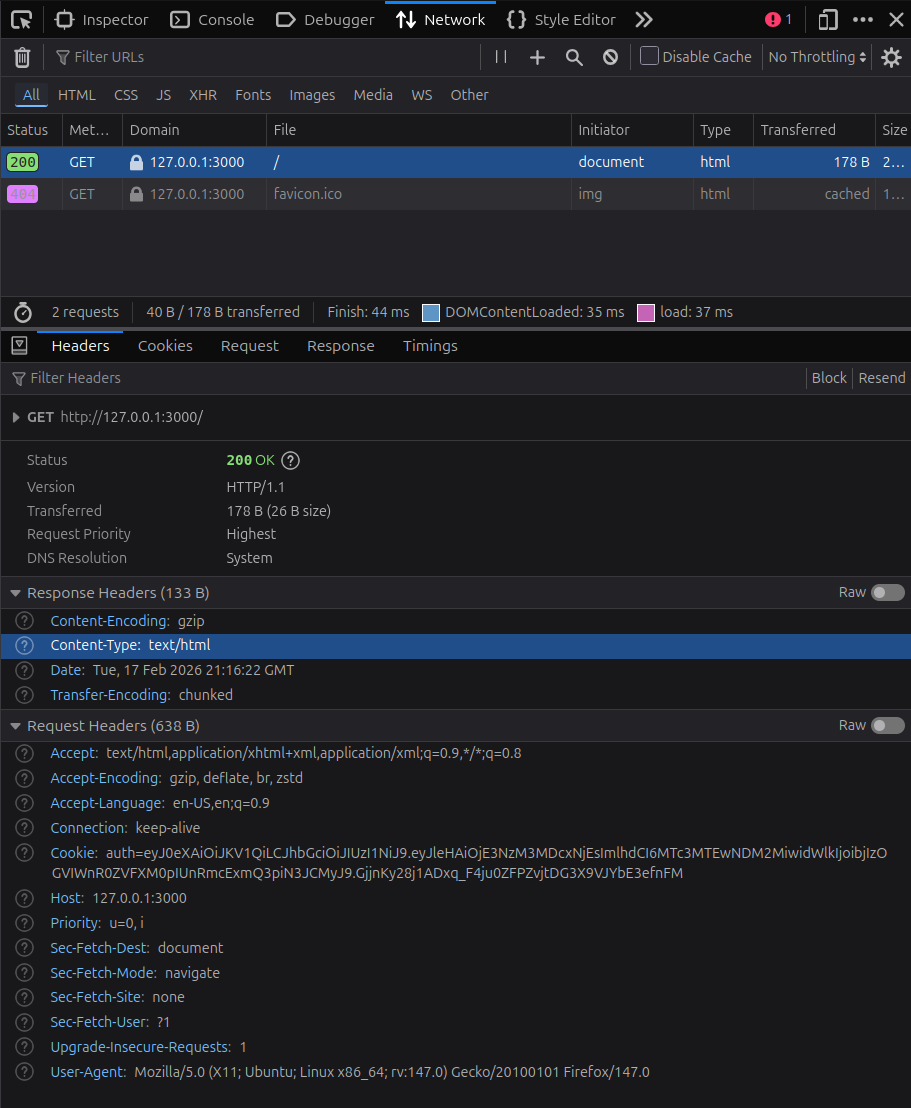
You can as well use the curl CLI:
curl -i http://127.0.0.1:3000/This gives:
HTTP/1.1 200 OK
Date: Tue, 17 Feb 2026 21:21:41 GMT
Content-Type: text/html
Content-Length: 26
Having a vague idea of where to look for set headers and other response attributes is more than enough, and will come in handy when debugging your applications.
10.5.1 htmltools
When dealing with HTML, it’s often more convenient to use {htmltools} because it:
- Allows you to write HTML as structured R code.
- Makes your code more readable when generating complex HTML dynamically.
- Prevents common escaping mistakes.
library(htmltools)

app$get("/", function(req, res){
  res$send(tags$h3("hello, world!"))
})

app$get("/about", function(req, res) {
  html <- tagList(
    tags$h3("About Us"),
    tags$p("The Ambiorix R Web Framework")
  )

  res$send(html)
})
When you pass a tag, tagList, or any {htmltools} object, Ambiorix renders it before sending the response.
Because HTML is just data, you can build it programmatically:
app$get("/users", function(req, res) {
  users <- c("Alice", "Bob", "Charlie")

  html <- tags$ul(
    lapply(users, tags$li)
  )

  res$send(html)
})
With {htmltools}, you never have to manually paste HTML strings together.
10.5.2 Reprex
Here’s a reprex using Bootstrap:
library(ambiorix)
library(htmltools)

#' Generic HTML page
#'
#' @param ... Passed to the body tag of the html document.
#' @return [htmltools::tags$html]
#' @export
page <- function(...) {
  tags$html(
    lang = "en",
    tags$head(
      tags$meta(charset = "utf-8"),
      tags$meta(
        name = "viewport",
        content = "width=device-width, initial-scale=1"
      ),
      tags$title("HTML demo"),
      tags$link(
        href = "https://cdn.jsdelivr.net/npm/bootstrap@5.3.3/dist/css/bootstrap.min.css",
        rel = "stylesheet",
        integrity = "sha384-QWTKZyjpPEjISv5WaRU9OFeRpok6YctnYmDr5pNlyT2bRjXh0JMhjY6hW+ALEwIH",
        crossorigin = "anonymous"
      )
    ),
    tags$body(
      class = "bg-light",
      ...
    )
  )
}

#' Home page
#'
#' @export
home_page <- function() {
  bgs <- c("primary", "success", "secondary", "dark", "danger", "white", "light")
  bg_divs <- lapply(bgs, function(bg) {
    class <- c(
      "col-12 col-md-4",
      "border border-dark-subtle",
      paste0("bg-", bg)
    )

    tags$div(
      class = class,
      style = "min-height: 250px"
    )
  })
  bg_divs <- tags$div(
    class = "row",
    bg_divs
  )

  page(
    tags$div(
      class = "container vh-100 bg-white",
      tags$h3("Hello, World!"),
      tags$p("This example is using bootstrap 5.3.3"),
      bg_divs
    )
  )
}

#' Handler for GET at '/'
#'
#' @export
home_get <- function(req, res) {
  res$send(home_page())
}

Ambiorix$new(port = 3000L)$
  get("/", home_get)$
  start()
10.6 Text
To send plain text over the wire, use res$text().
It conveniently sets the Content-Type header to text/plain.
library(ambiorix)

app <- Ambiorix$new()

app$get("/", function(req, res) {
  res$text("Hello! This is plain text.")
})

app$start(port = 3000L)
You will mostly use res$text() if you want the client (browser or server) to render the string returned by your application as-is.
10.7 Files
You will often need to send files over the wire. A .pdf after your Quarto report has finished rendering, a .csv/.xlsx sharing data with the client, or any other file on disk that you want to deliver to visitors of your application.
Ambiorix has convenience methods for common file types like images (res$image(), res$png(), res$jpeg()) and tabular data (res$csv(), res$tsv()).
For everything else, the pattern is straightforward: read the file as raw bytes, set the right headers, and send.
10.7.1 Sending Binary Data
At the lowest level, res$send() accepts raw bytes. This means you can send any file type as long as you read it into a raw vector and set the appropriate Content-Type header.
library(ambiorix)

app <- Ambiorix$new(port = 3000L)

app$get("/image", function(req, res) {
  path <- "fellowship-of-the-ring.jpg"

  bin_data <- readBin(
    con = path,
    what = "raw",
    n = file.info(path)$size
  )

  res$header("Content-Type", "image/jpeg")
  res$send(bin_data)
})

app$start()
That’s the core idea:
readBin()reads the file into a raw vector.res$header()tells the client what kind of data it’s receiving.res$send()sends the bytes.
This works for images, PDFs, ZIP archives – anything. The only thing that changes is the MIME type you set in the Content-Type header. Refer to the MIME types table earlier in this chapter.
10.7.2 Triggering a Download
When you send binary data the way we just did, the browser will try to display the content inline. An image renders on the page. A PDF opens in the browser’s PDF viewer.
Sometimes that’s what you want. Other times you want the browser to download the file instead. That’s what the Content-Disposition header is for.
Set it to attachment and include a filename:
#' Handle GET at '/download-resume'
#'
#' @export
download_resume <- \(req, res) {
  path <- "resume.pdf"

  binary <- readBin(
    con = path,
    what = "raw",
    n = file.info(path)$size
  )

  res$header("Content-Type", "application/pdf")
  res$header(
    "Content-Disposition",
    "attachment; filename=resume.pdf"
  )
  res$send(binary)
}
When the client hits this endpoint, the browser opens a save dialog instead of rendering the PDF inline.
10.7.3 Images
For PNG and JPEG files, Ambiorix provides dedicated methods so you don’t have to handle the binary reading yourself:
# auto-detects png or jpeg from the file extension
app$get("/photo", function(req, res) {
  res$image(file = "photo.jpeg")
})

# or be explicit
app$get("/logo", function(req, res) {
  res$png(file = "logo.png")
})
These methods read the file, set the Content-Type header, and send the raw bytes for you.
You can also send a {ggplot2} plot directly:
library(ggplot2)

app$get("/plot", function(req, res) {
  p <- ggplot(mtcars, aes(wt, mpg)) +
    geom_point()

  res$ggplot2(plot = p, type = "png")
})
res$ggplot2() saves the plot to a temporary file, sends the image, then cleans up.
10.7.4 CSV & TSV
res$csv() and res$tsv() serialize a data frame and send it as a downloadable file. They set both the Content-Type and Content-Disposition headers automatically.
app$get("/data", function(req, res) {
  res$csv(data = mtcars, name = "mtcars")
})
Visiting /data triggers a download of mtcars.csv. The name argument controls the filename.
10.7.5 Base64 Encoding
There are cases where you want to embed a file directly in an HTML response rather than serve it from a separate endpoint. Base64 encoding lets you do that.
library(ambiorix)
library(htmltools)
library(base64enc)

app <- Ambiorix$new(port = 3000L)

app$get("/", function(req, res) {
  base64_string <- base64encode("the-one-ring.webp")
  data_url <- paste0("data:image/webp;base64,", base64_string)

  html <- tags$div(
    tags$h3("Embedded Image"),
    tags$img(
      src = data_url,
      alt = "The one ring",
      height = 500
    )
  )

  res$send(html)
})

app$start()
The image is encoded into the HTML itself – no separate request needed. This is convenient for small assets, but keep in mind that Base64 increases the payload size by roughly 33%. For larger files, serve them from their own endpoint or as static files.
10.7.6 Reprex
Here’s a reprex that puts it all together – binary data from a dedicated endpoint and a Base64-embedded image on the same page:
library(ambiorix)
library(htmltools)
library(base64enc)

app <- Ambiorix$new(port = 3000L)

#' Handle GET at '/binary'
#'
#' @export
binary_get <- function(req, res) {
  path <- "fellowship-of-the-ring.jpg"
  bin_data <- readBin(
    con = path,
    what = "raw",
    n = file.info(path)$size
  )

  res$header("Content-Type", "image/jpeg")
  res$send(bin_data)
}

app$get("/binary", binary_get)

#' Handle GET at '/'
#'
#' @export
home_get <- function(req, res) {
  base64_string <- base64encode("the-one-ring.webp")
  data_url <- paste0("data:image/webp;base64,", base64_string)

  html <- tags$div(
    tags$h3("Binary data"),
    tags$img(
      src = "/binary",
      alt = "Fellowship of the ring",
      height = 500
    ),
    tags$h3("Base64 Encoded"),
    tags$img(
      src = data_url,
      alt = "The one ring",
      height = 500
    )
  )

  res$send(html)
}

app$get("/", home_get)

app$start()
10.8 Render
An .html, .md or .R file can also be rendered. The difference with send_file is that it will use data to process [% tags %]. You can read more it in the templates documentation.
# renders templates/home.html
# replaces [% title %]
app$get("/:book", function(req, res){
  res$render("home.html", data = list(title = req$params$book))
})

# renders docs/index.md
app$get("/docs", function(req, res) {
  res$render("index.md")
})
10.9 Hooks
Hooks are functions that run before or after rendering, allowing for pre-processing and post-processing of content.
10.9.1 Pre-render hooks
A pre-render hook runs before the render() and send_file() methods. Pre-render hooks are meant to be used as middlewares to, if necessary, do pre-processing before rendering.
It must accept at least 4 arguments:
self: The Request class instance.content: String. [File] content of the template.data: Named list. Passed from therender()method.ext: String. File extension of the template file.
Include ... in your hook to ensure it will handle potential updates to hooks in the future.
The pre-render hook must return an object of class ‘responsePreHook’ as obtained by ambiorix::pre_hook().
my_prh <- function(self, content, data, ext, ...) {
  data$title <- "Mansion"
  pre_hook(content, data)
}

#' Handler for GET at '/'
#'
#' @details Renders the homepage
#' @export
home_get <- function(req, res) {
  res$pre_render_hook(my_prh)
  res$render(
    file = "page.html",
    data = list(
      title = "Home"
    )
  )
}
In the above example, even though we have provided the title to render() as “Home”, it is changed in my_prh() to “Mansion”.
10.9.2 Post-render hooks
A post-render hook runs after the rendering of HTML. It must be a function that accepts at least 3 arguments:
self: The ‘Response’ class instance.content: String. [File] content of the template.ext: String. File extension of the template file.
Also, include ... in your hook to ensure it will handle potential updates to hooks in the future.
Ideally, it should return the content.
my_prh <- function(self, content, ext, ...) {
  print("Done rendering!")
  content
}

#' Handler for GET at '/'
#'
#' @details Renders the homepage.
#'
#' @export
home_get <- function(req, res) {
  res$
    post_render_hook(my_prh)$
    render(
    template_path("page.html"),
    list(
      title = "Home",
      content = home()
    )
  )
}
After each render on the home page, my_prh() will print “Done rendering!” on the console.
10.9.3 Setting a Global Hook
You can set a global pre-render or post-render hook using middleware.
This is useful when you need to ensure that all rendering operations automatically apply the hook without explicitly setting it in every route.
Consider the following template, page.html:
<!DOCTYPE html>
<html lang="en">

<head>
  <title>[% title %]</title>
</head>

<body>

  <div>
    [% content %]
  </div>

</body>

</html>
And the corresponding index.R:
library(ambiorix)

#' A pre-render hook
#'
#' @param self The request class instance.
#' @param content String. [file] content of the template.
#' @param data Named list. Passed from the [render()] method.
#' @param ext String. File extension of the template file.
my_prh <- function(self, content, data, ext, ...) {
  data$title <- "Mansion"
  pre_hook(content, data)
}

#' Middleware to set a global pre-render hook
#'
#' @export
m1 <- function(req, res) {
  res$pre_render_hook(my_prh)
}

#' Handler for GET at '/'
#'
#' @details Renders the homepage
#' @export
home_get <- function(req, res) {
  res$render(
    file = "page.html",
    data = list(
      title = "Home",
      content = "<h3>hello, world</h3>"
    )
  )
}

Ambiorix$new(port = 3000L)$
  set_error(error_handler)$
  use(m1)$
  get("/", home_get)$
  start()
Notice how even though res$render() sets the title as "Home", the global pre-render hook my_prh(), modifies it to "Mansion".
Since the middleware m1 is applied globally, this change affects all rendering operations across the application.